

11 Common Mistakes That Slow Down Your Home Studio Workflow
Greetings mate and Welcome aboard! Stuart Charles here, HomeStudioBasics.com helping YOU make sound decisions, so…
Building a home recording studio is an exciting leap. It promises creative freedom, endless tinkering, and the ability to capture inspiration the moment it strikes. Yet, for many, the reality often involves frustrating delays, technical headaches, and sessions that produce more stress than music.
The dream of a seamless home recording studio setup can quickly fade if foundational mistakes creep in. These errors don’t just cause minor annoyances; they actively sabotage your momentum, drain your creative energy, and slow your progress to a crawl.
Let’s identify these common pitfalls and, more importantly, outline clear strategies to vault over them for good.
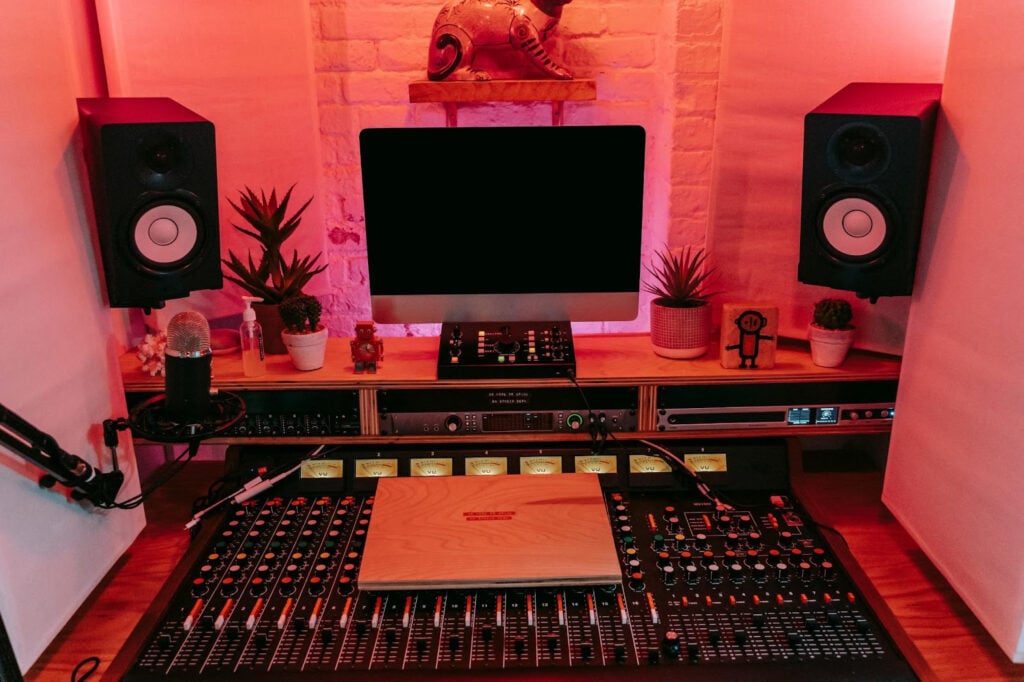
Mistake #1: The Chaotic Workspace – Where Creativity Goes to Die
You might think a little mess is a sign of a busy mind. In a home studio, it’s a sign of impending workflow disaster.
Cables resembling a plate of spaghetti, gear piled on the desk, and hunting for that one specific adapter for twenty minutes is the antithesis of productivity.
A 2023 survey by Buffer on music production habits indicated that nearly 68% of producers reported losing at least 30 minutes per session to “organizational overhead” – simply finding things, troubleshooting connections, or clearing space to work.
The Fix: Intentional Design and Cable Dominion
Your physical space must serve your process.
Start with the desk. Is it deep enough? Sturdy?
Consider dedicated studio furniture designed to handle weight and offer cable routing. Then, declare war on cables. Use velcro straps, zip ties, or dedicated cable sleeves. Route them cleanly behind desks and label both ends.

A simple patch bay for your audio interface can eliminate the need to crawl behind your desk constantly. Implement the “one-touch” rule: any piece of gear you use daily (MIDI keyboard, primary microphone) should be ready to go instantly.
- Related: What is MIDI? [Beginner’s Guide]
Everything else should have a dedicated, labeled home. This isn’t about sterile minimalism; it’s about removing every tiny decision and physical barrier between you and hitting the record button.
Mistake #2: The Myth of “More Gear” Before Mastery
The allure of new plugins, a flashier interface, or another microphone is powerful. It feels like progress.
But constantly chasing gear, especially before you deeply understand what you already own, is a major workflow killer. You spend hours watching demos, installing software, and learning new interfaces instead of making music. Your home studio setup becomes a museum of underutilized technology.
The Fix: The Deep Dive and Strategic Upgrades
Commit to an “exploration month” with your existing tools.
Choose one synth, one compressor plugin, and one reverb. Read its manual.
Experiment with every parameter on sounds you wouldn’t normally make. The goal is to move from preset surfing to purposeful sound design. This knowledge is permanent and transferable.
When you do upgrade, let it be a strategic solution to a verified problem.
Can’t get a clean vocal recording because of room reflections? Treat the room before buying a $2000 microphone.
Need more analog characters? Then an outboard preamp might be the answer.
Quality over quantity always wins. A streamlined, familiar toolkit is infinitely faster than a vast, confusing one.
Mistake #3: Neglecting the Room Itself

This is arguably the most overlooked aspect. You can own the finest microphone in the world, but if your room sounds like a tiled bathroom, your recordings will suffer.
Comb filtering, bass buildup, and flutter echo aren’t issues you can reliably “fix in the mix.” Trying to do so is a massive time-sink, leading to endless EQ tweaks, frustration, and subpar results.
The Fix: Acoustic Treatment Before Astonishment
Forget “soundproofing” for now (that’s about keeping sound in/out). Focus on treatment: managing the sound inside your room.
Start at the first reflection points. Sit in your mix position and have a friend slide a mirror along the side walls and ceiling. Wherever you see your speakers, that’s a first reflection point. Place affordable acoustic panels there. Bass traps in the corners are crucial for low-end control. Even heavy moving blankets strategically hung can make a dramatic difference. A well-treated, even-sounding room means you can trust what you hear. Decisions become faster and more confident, speeding up every stage from recording to mixing.
Mistake #4: The Template Vacuum
Starting every new song from a completely blank slate—no tracks, no buses, no settings—is like building a new workshop for every project. It’s repetitive, slow, and invites inconsistency.
The Fix: Build Your Creative Launchpad
Create a template in your Digital Audio Workstation (DAW) that reflects your common starting points. This isn’t limiting; it’s liberating. Your template might include:
- Audio tracks labeled for your most common sources (Vocals, Guitar DI, Guitar Amp, etc.) with input routing already set.
- A pre-configured drum bus with routing for your favorite drum machine or sampler.
- Group buses (e.g., “All Vocals,” “Guitars,” “Synths”) with basic compression and EQ inserts, turned off but ready.
- A master bus with your go-to metering and a subtle limiter for monitoring.
The moment inspiration hits, you load the template, and you’re already 80% set up. You’re composing, not configuring.
Mistake #5: Connection & Data Management Nightmares
In our connected age, a poor internet connection or clumsy file management can bring everything to a halt. Downloading a needed plugin update, collaborating by sending large sessions, or accessing sample libraries can become an exercise in patience.
Furthermore, relying on a single, slow hard drive for everything is a ticking time bomb. Drive failure or corruption means lost work, and slow load times bog down every session.
The Fix: Optimize Your Digital Pipeline
For your data, adopt the 3-2-1 backup rule: 3 total copies of your data, on 2 different mediums (e.g., internal SSD and external HDD), with 1 copy offsite (cloud). Use a fast SSD for your OS and current projects, a large internal or fast external drive for sample libraries, and a robust, automated backup system.
For connectivity issues, especially when transferring large, sensitive session files to collaborators or accessing region-restricted software tools, a reliable VPN can be a crucial part of your home studio setup. Using a privacy tools trial, like the one offered by VeePN, can help you evaluate if a secure, stable connection improves your ability to share work and access resources without throttling or security concerns. And yes, even a VPN free trial can help. Remember, a slow computer or network is a creative mood-killer.
Mistake #6: No Session Discipline (The Endless Tweak Loop)
Sitting down without a goal leads to aimless tweaking. You start recording a guitar part, then decide to tweak the amp sim for an hour. You open a synth to write a bassline and get lost designing a sound for a track that doesn’t exist. This is the killer of momentum.
The Fix: Phase-Based Work and Time Boxing
Separate your creative phases decisively. Dedicate sessions to specific tasks:
- Tracking Day: Your only job is to capture performances. No mixing, minimal sound tweaking. Get it recorded.
- Sound Design Day: Create your palette of synth patches, drum kits, and effects chains. Save them as presets for your writing days.
- Mixing Day: Put on your analytical hat. Reference tracks, balance, process.
Use a timer. Give yourself 20 minutes to find a drum sound, then move on. The constraint breeds creativity and incredible speed. Learn keyboard shortcuts for your DAW religiously; they are the single biggest speed hack available.
Mistake #7: Ignoring Your Monitoring Environment
Mixing at extreme volumes fatigues your ears quickly, leading to bad decisions. Worse, mixing solely on headphones or tiny desktop speakers gives you a false picture of the low end and stereo image.
The Fix: Calibrate and Validate
Set a consistent, conservative monitoring level (around 75-85 dB SPL is a common standard). Use an SPL meter app as a rough guide. This reduces ear fatigue and makes your judgments more consistent.
Secondly, you must know your monitoring system intimately.
Reference a handful of professionally mixed songs you love at your standard mixing volume. Learn how a good mix sounds in your room, on your speakers, and on your headphones.
Then, constantly check your mixes on other systems—the car, earbuds, a Bluetooth speaker. This “reality check” loop will train your ears and prevent painful revisions.
Mistake #8: Perfectionism in the Tracking Phase
Trying to record the “perfect,” completely polished take in one go is paralyzing. You stop the flow to punch in on a single flawed note, destroying the emotional arc of a performance. You prioritize technical perfection over feel.
The Fix: Comping and The Magic of Good Enough
Record multiple full takes (they’re called “passes”). Don’t stop. Embrace the slight imperfections that give a performance life.
Then, use your DAW’s comping feature to create a single, master take by selecting the best sections from each pass. This is non-destructive and incredibly fast.
For rhythmic parts, if editing is necessary, use slip-editing or your DAW’s quantize functions judiciously—often 70-90% strength retains the feel while tightening the groove. Prioritize the vibe. You can always fix one glaring note, but you can’t manufacture a compelling feel after the fact.
Mistake #9: The Never-Ending Plugin Chain – Paralysis by Choice
Modern music production offers an almost infinite arsenal of plugins. Every channel can become a deep, tweakable rabbit hole of serial processors: an EQ, then a compressor, then another EQ for “color,” then a tape saturator, then a dynamic EQ.
This “more must be better” approach during the initial creative phase is a momentum killer. You’re no longer listening to the music; you’re engineering a single snare drum for 45 minutes. The mix becomes a dense, over-processed swamp before the first chorus is even written.
The Fix: The Minimalist Signal Path and Commit Early
Adopt a “less is more” mindset during tracking and initial arranging.
Ask yourself: “Does this track need compression right now, or am I just adding it because I always do?”
Start with nothing on your channels. Only add a processor when you can clearly articulate the problem it’s solving. Is the vocal uneven? Then add a compressor. Is the guitar boxy? Then reach for an EQ.
Furthermore, learn to commit.
Bounce that heavily affected synth part to audio. Print that guitar tone with the amp sim. This frees up CPU, prevents endless retrospective tweaking, and turns your abstract “project” into tangible, finished audio files. It’s a decision that propels you forward.
Mistake #10: The Solo Button Addiction
It is tempting, almost instinctual, to hit the solo button to examine a track in isolation. While crucial for surgical tasks like removing a click or tuning a vocal, over-reliance on solo during mixing is a catastrophic error. You lose all context.
A guitar that sounds thin and weak in solo might be the perfect, glue-like element in the full mix. That bass that sounds overwhelmingly boomy by itself might be precisely what anchors the track. Constantly toggling solo disrupts your perception of balance, which is the entire goal of mixing.
The Fix: Mix in Context, Use Solo Sparingly
Train yourself to listen to the whole picture.
Make your initial level balances and EQ adjustments with all tracks playing. Use solo for two things only: 1) Identifying technical problems (clicks, pops, distortion), and 2) A/B comparing a processed signal with the dry signal while the full mix is playing in the background.
A powerful technique is to use low-cut and high-cut filters on your master bus to isolate frequency ranges (e.g., listen only to 100-500Hz to check bass/midrange conflict) without actually soloing a single instrument. This maintains the musical relationship between parts and leads to faster, more musical decisions.
Mistake #11: Ignoring Your Own Physical and Mental Energy
Your studio is a system, and you are its most important component.
Attempting complex vocal takes when you’re tired, or diving into a detailed mix after a long workday, is a recipe for slow progress and poor results.
Pushing through ear fatigue or creative burnout doesn’t produce quality; it ingrains bad habits and leads to decisions you’ll regret tomorrow. The myth of the all-night, coffee-fueled session is just that—a myth that produces sluggish workflows.
The Fix: Schedule Your Creativity and Respect Your Limits
Map your energy levels. Are you sharpest in the morning? Schedule critical listening and editing then. More emotionally open in the evening? That’s your time for writing and recording. Use a timer to enforce breaks—the Pomodoro Technique (25 minutes of work, 5-minute break) is excellent for maintaining focus.
Keep water at your desk and pay attention to posture. Most importantly, know when to walk away. If you’ve been EQing the same kick drum for 30 minutes without progress, stop. Fresh ears solve problems in minutes that tired ears struggle with for hours. This isn’t slacking; it’s optimizing your primary asset: your attention.
The Path to Fluid Creation
Optimizing your home recording studio setup isn’t about spending endless money. It’s about mindful, intentional choices that remove friction.
It’s about treating your studio not just as a collection of gear, but as a system designed for a single purpose: to translate your ideas into sound with the least possible resistance.
By tackling these common mistakes—organizing your space, mastering your tools, treating your room, templating your work, securing your data, disciplining your sessions, trusting your monitors, and embracing imperfection—you rebuild that system for speed.
You stop working for your studio, and finally, your studio works for you. The result? More music, less frustration, and a workflow that fuels your passion instead of extinguishing it. Now, go create.
Full Home Studio Guide
Interested in a full guide covering everything you’ll need, laid out in a simple-to-follow step-by-step plan?
Well, that’s about it for today my friend! I hope you’ve enjoyed this Common Mistakes That Slow Down Your Home Studio Workflow and came away with some valuable insight.
Questions? Comments? Requests? Did I miss the mark on something? Please leave them down below or Contact me!!
If you love what I do here and want to support the blog and channel in a more personal way, check me out on Patreon and discover all the value I have to offer you.
What is your biggest pain point, and how can I help? I would love to hear from you. Until next time…
All the best and God bless,

-Stu
[Xtr@Ba$eHitZ] > Now AudioFiles Anonymous